
Key Takeaways
- Flux.1 Kontext Dev excels in character consistency and iterative, local editing, making it ideal for creators who need to modify specific elements in an image without altering the entire scene.
- Firered Image Edit 1.0 leads in benchmark performance and complex, instruction-based editing, particularly for multi-image composition, text preservation, and handling detailed, composite commands.
- The choice between models depends on your primary need: Fluid, step-by-step refinement (Kontext Dev) versus powerful, one-shot complex edits (Firered).
- Instruction-based image editing is revolutionizing creative workflows by allowing natural language commands, moving beyond traditional inpainting or img2img methods.
- Platforms like PearlFrame integrate advanced models like these, providing accessible interfaces to leverage cutting-edge AI for image generation and transformation without technical setup.
Introduction
The landscape of AI image editing is evolving at a breakneck pace, moving from simple filters to models that understand and execute complex natural language instructions. In this arena, two powerful open-weights models have sparked significant interest: Flux.1 Kontext Dev from Black Forest Labs and Firered Image Edit 1.0 from the FireRedTeam. This head-to-head analysis, Flux.1 Kontext Dev vs Firered Image Edit 1.0, aims to dissect their capabilities, strengths, and ideal applications. Whether you're a digital artist, content creator, or developer, understanding the nuances between these models is key to selecting the right tool for your vision. We'll explore their core technologies, benchmark performances, and practical use cases to determine which AI image editor might come out on top for your specific needs.
What is Instruction-Based Image Editing?
Before diving into the comparison, it's crucial to understand the paradigm shift these models represent. Instruction based image editing is a breakthrough approach where AI modifies an existing image based on a textual command, similar to giving instructions to a human editor.
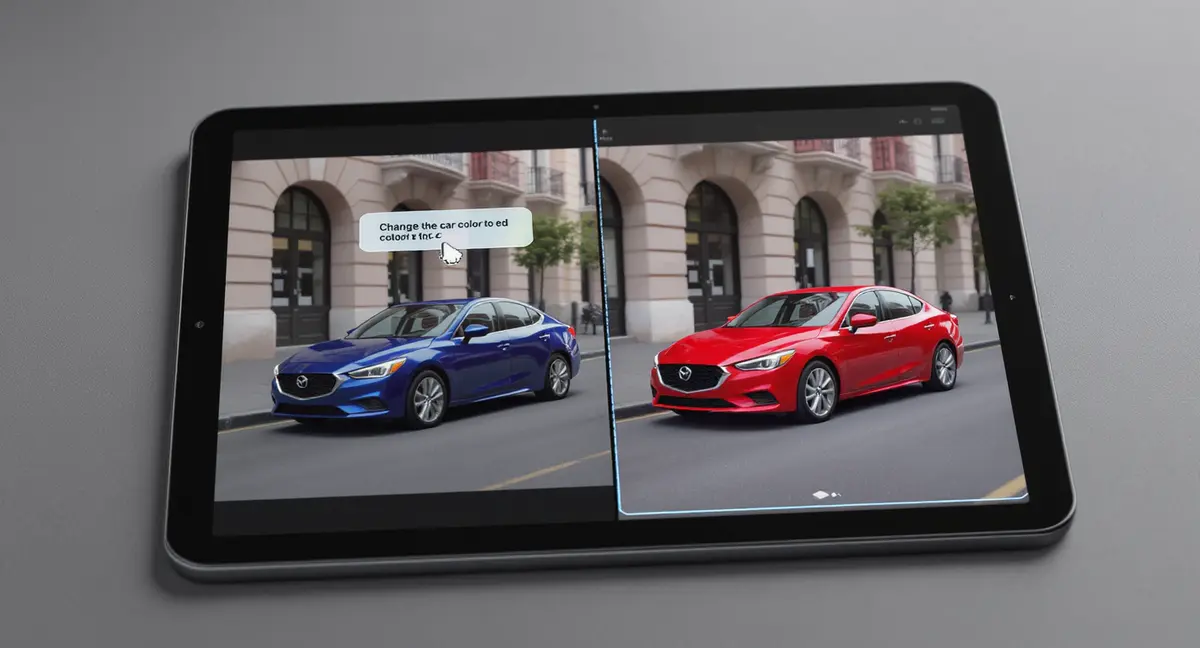
Unlike traditional methods, it doesn't require you to describe the entire final scene or meticulously mask areas. Instead, you command changes directly: "change the car color to red," "remove the background person," or "replace the text on that sign." The model's intelligence lies in its ability to interpret the instruction, locate the relevant elements within the image, and apply the edit while preserving the untouched parts with high fidelity. This move towards natural language control makes advanced editing accessible to everyone, not just Photoshop experts.
Flux.1 Kontext Dev: The Iterative Editing Specialist
Released as an open-weights model under a non-commercial license, Flux.1 Kontext Dev is the accessible variant of Black Forest Labs' Kontext family. It's built on a 12B parameter diffusion transformer, designed to run locally on consumer hardware with sufficient VRAM.
Key Features & Strengths
- Superior Character Consistency: This is Kontext Dev's standout feature. It can take a reference image of a character or object and place it into entirely new scenes while maintaining its core identity, pose, and style. This eliminates the need for fine-tuning LoRAs for consistent character generation.
- Localized, Surgical Edits: The model is exceptionally good at making precise changes without affecting the rest of the image. Changing an item's color, adding a small object, or altering clothing details are tasks it handles with minimal disruption to the overall composition.
- Iterative Editing Workflow: Kontext Dev is designed for step-by-step refinement. You can apply one edit, use the output as the new input, and apply another command, building up complex transformations while maintaining coherence—a game-changer for creative exploration.
- Text Editing Capabilities: It can modify text within images (e.g., changing "FOR SALE" to "SOLD") while attempting to preserve the original font style and layout, a notoriously difficult task for AI.
Performance Snapshot
On benchmarks like ImgEdit, the earlier FLUX.1 Kontext [Dev] scored 3.71 overall, showing competence but being outperformed by newer models. Its strength isn't always raw benchmark scores but in the qualitative fluidity of its iterative process and consistency in edits.
Firered Image Edit 1.0: The Benchmark Powerhouse
Firered Image Edit 1.0 is a general-purpose, open-source editing model that emerged with a focus on massive-scale training and comprehensive benchmark performance. Trained on a meticulously curated corpus of 1.6 billion samples, it employs a multi-stage pipeline including reinforcement learning.
Key Features & Strengths
- State-of-the-Art Benchmark Results: As per its technical report, Firered Image Edit 1.0 achieves leading scores among open-source models on key benchmarks like ImgEdit (4.56 overall), GEdit, and its own REDEdit-Bench. It competes closely with, and sometimes surpasses, proprietary models like Nano-Banana Pro.
- Multi-Image Composition & Editing: A unique and powerful feature is its ability to process multiple reference images in a single command. You can instruct it to "put the person from Figure 1 in the outfit from Figure 2," enabling advanced virtual try-on and complex scene compositing.
- Exceptional Text Style Preservation: The model demonstrates high fidelity in text editing tasks, maintaining font styles, colors, and backgrounds when changing words, which is critical for editing graphics, memes, or marketing materials.
- Broad Editing Category Mastery: The REDEdit-Bench, introduced by the FireRed team, tests 15 categories including Add, Adjust, Remove, Replace, Beautify, and Low-level enhancement. Firered shows strong, balanced performance across this wide spectrum, indicating robustness for diverse, real-world editing instructions.
- Photo Restoration: It includes specialized capabilities for high-quality old photo restoration and enhancement.

Head-to-Head: Flux.1 Kontext Dev vs Firered Image Edit 1.0
This ai image editing model comparison breaks down their performance across critical dimensions.
| Feature | Flux.1 Kontext Dev | Firered Image Edit 1.0 |
|---|---|---|
| Core Strength | Iterative edits, character consistency | One-shot complex edits, benchmark performance |
| Editing Approach | Excellent at local, targeted modifications | Excels at holistic, instruction-following across complex scenes |
| Multi-Image Input | Primarily single-image reference for consistency | Native support for multi-image composition and editing |
| Text Editing | Good, with style preservation | Excellent, with benchmark-leading text style fidelity |
| Ideal Workflow | Step-by-step creative refinement | Powerful, single-command execution for well-defined edits |
| Benchmark (ImgEdit Overall) | 3.71 | 4.56 (State-of-the-art open-source) |
| Model Size | 12B parameters (lightweight) | ~28B parameters (heavier, more powerful) |
| GPU Memory Needed | ~16 GB (FP8 quantized) | ~17–40 GB (FP8 to full BF16) |
| License | Non-commercial research only | Apache 2.0 (fully open-source, commercial OK) |
| Language Support | English prompts | English and Chinese prompts |
| Text-to-Image Generation | Yes — unified model for both generation and editing | Built on T2I foundation, but optimized primarily for editing |
| Creative / Style Variety | Strong — excels at style transfer and artistic reimagining | Good — focused more on fidelity than creative transformation |
The Verdict So Far: If your work revolves around developing a character or object through multiple sequential scenes and edits, Flux.1 Kontext Dev is compelling. For tasks requiring executing a detailed, composite instruction in one go—especially involving multiple sources or precise text manipulation—Firered Image Edit 1.0 has the edge.
Text-to-Image Generation and Creative Capabilities
Beyond pure editing, one important dimension separates these two models: the ability to generate images from scratch and express creative vision.
Flux.1 Kontext Dev: A Unified Creative Engine
Flux.1 Kontext Dev isn't just an image editor — it's a unified model that handles both text-to-image generation and image editing within a single architecture. This means you can use it to create a brand-new image from a text description, and then iteratively refine that same image through editing commands, all within one seamless workflow.
This dual capability matters for creative professionals. Imagine generating a character portrait from a text prompt, then placing that character into different scenes, changing outfits, and adjusting lighting — all while the AI maintains perfect consistency. On Black Forest Labs' own KontextBench, the model demonstrates strong performance in aesthetics, prompt following, typography, and photorealism, outperforming many open and even some closed models in human preference evaluations.
Flux.1 Kontext Dev also excels at style transfer and artistic reimagining. You can take a photograph and transform it into watercolor, anime, pixel art, or oil painting styles while preserving the core composition and subject identity. This creative flexibility makes it especially appealing for artists, illustrators, and content creators who want to explore different visual directions quickly.
Firered Image Edit 1.0: Editing-First, Generation-Capable
Firered Image Edit 1.0 was built on top of a text-to-image foundation model and trained on 900 million text-to-image pairs alongside 700 million editing pairs. So while it can generate images from text, its architecture and training are heavily optimized for editing accuracy and instruction following rather than pure creative generation.
Where FireRed shines creatively is in structured creative editing — tasks that require deep instruction understanding, implicit scene reasoning, and global compositional restructuring. For example, it can handle complex creative prompts like "transform this daytime city scene into a cyberpunk nightscape" while maintaining the structural integrity of buildings and street layout. It also leads in low-level enhancements like sharpening, denoising, and color grading, which are essential for professional photo post-processing.
However, for pure text-to-image generation — creating something entirely new from imagination — Flux.1 Kontext Dev currently offers a more polished and versatile experience, with better prompt adherence for creative and artistic outputs.
| Creative Dimension | Flux.1 Kontext Dev | Firered Image Edit 1.0 |
|---|---|---|
| Generate images from text | ✅ Full text-to-image capability | ⚠️ Capable but editing-optimized |
| Style transfer | ✅ Excellent (photo → anime, watercolor, etc.) | ⚠️ Good but less diverse |
| Typography in generated images | ✅ Strong (KontextBench validated) | ✅ Strong (OCR reward training) |
| Artistic reimagining | ✅ Highly creative, exploratory | ⚠️ More faithful, less experimental |
| Photo enhancement / restoration | ⚠️ Basic | ✅ Excellent (specialized training) |
How to Choose the Right AI Image Editor for Your Needs
Selecting between these models isn't about picking the "best" in absolute terms, but the best for your specific use case. Here’s a step-by-step guide:
- Define Your Primary Task: Are you creating a comic with a consistent character (leaning Kontext Dev), or are you producing marketing visuals that require compositing products with models (leaning Firered)?
- Evaluate Your Workflow: Do you prefer an exploratory, iterative process where you build up an image? Or do you have a clear, final vision you want executed in a single prompt?
- Consider Technical Access: Kontext Dev can be run locally by enthusiasts with powerful GPUs. Firered Image Edit 1.0 is often more readily accessed through AI platform APIs. For many users, a platform like PearlFrame, which harnesses the power of such advanced models through a simple interface, is the most practical choice. It allows you to focus on creativity without managing hardware or complex code.
- Test with Your Data: If possible, run similar editing prompts through both models (or platforms that offer them). The qualitative feel of the output—how well it preserves unintended elements—is as important as benchmark scores.
- Factor in Cost and Speed: For volume work, API pricing and generation speed become critical. Firered may offer more "bang for the buck" in terms of instruction accuracy per generation, while Kontext Dev's iterative nature might require more steps to achieve a complex result.
Ready to bring your ideas to life? Try creating your own unique AI image right here.
Practical Applications and The Role of Integrated Platforms
Understanding these models is one thing; applying them effectively is another. Here are real-world scenarios:
- Content Creation & Social Media: Quickly edit photos for posts—remove distractions, change backgrounds, or add elements. For instance, using an instruction like "make this café background look like a sunset patio" can transform a standard shot. Tools that simplify this process are invaluable for creators.
- E-commerce & Product Visualization: Firered's multi-edit capability is perfect for virtual try-on or placing a product in different settings. This can drastically reduce the need for expensive photo shoots.
- Concept Art & Storyboarding: An artist could use Kontext Dev to place a concept character into various environmental sketches while keeping the design perfectly consistent, speeding up the iteration process.
- Marketing Material Localization: Need to change the text on a poster for a different region? Both models have text-editing capabilities, with Firered showing particularly strong results in preserving original styling.
For most professionals and hobbyists, the complexity of running these models locally is a barrier. This is where all-in-one AI image generation platforms shine. PearlFrame, for example, integrates state-of-the-art models into a user-friendly workflow. You can achieve professional-grade instruction based image editing or generate entirely new visuals from text without ever worrying about GPU memory or command lines. It’s akin to having a powerful AI editing suite at your fingertips, ready to bring ideas like consistent character art or complex photo composites to life with ease.
Conclusion
The Flux.1 Kontext Dev vs Firered Image Edit 1.0 debate highlights the exciting specialization within AI image editing. Kontext Dev is your go-to for narrative and character-focused work requiring faithful consistency across edits. Firered Image Edit 1.0 is a powerhouse for executing complex, detailed instructions in a single pass, especially when composition or text is involved.
Ultimately, the "winner" depends entirely on your project's demands. The true victory is for creators who now have access to such sophisticated tools. As these models continue to evolve, the line between imagination and visual reality becomes thinner.
Ready to experiment with these cutting-edge capabilities? You don't need a top-tier GPU to start. Try PearlFrame to experience the power of advanced AI image generation and editing. Describe your vision or upload a photo, and let AI handle the complex transformation, making professional editing accessible to everyone.
Frequently Asked Questions (FAQ)
Q: Can I use Flux.1 Kontext Dev or Firered Image Edit 1.0 for commercial projects? A: The licensing differs significantly. Flux.1 Kontext Dev is released under a non-commercial research license, meaning you cannot use the raw model weights for commercial purposes on your own. However, PearlFrame integrates the Flux.1 Kontext Dev model and provides full commercial usage rights — so you can generate and edit images for your business, products, or marketing materials without any licensing concerns. Firered Image Edit 1.0 is licensed under Apache 2.0, which is fully permissive for commercial use if you run it yourself. For most users, PearlFrame is the easiest path to commercial-grade AI image creation.
Q: Which model is better for beginners? A: Neither model is particularly "beginner-friendly" if running locally due to hardware and setup requirements. For beginners, a platform with a guided interface is best. PearlFrame offers a simple process to generate and edit images, abstracting away the complexity of the underlying models.
Q: How does instruction-based editing compare to traditional tools like Photoshop? A: It's complementary. AI editing excels at quick, semantic changes based on language (e.g., "make him look happier"). Photoshop offers pixel-level precision and control for fine-tuning. The future likely involves using AI for the heavy lifting and initial concepts, then polishing with traditional tools.
Q: Are there ethical concerns with using these AI editors? A: Yes, as with any powerful technology. It's important to use them responsibly, respect copyright and privacy, and not generate deceptive or harmful content. Most platforms, including PearlFrame, have safety measures and content guidelines in place.
Q: Where can I learn more about creating strong visual identities with AI? A: Check out our internal guide on What is Brand Identity and How to Build a Strong One with AI for insights on leveraging AI tools for cohesive brand visuals.