Key Takeaways
-
A VTuber avatar maker is a tool or software that allows you to design and animate a digital character for virtual streaming, with options ranging from free online creators to advanced 3D modeling programs.
-
The process involves planning your character, choosing between 2D and 3D models, designing the avatar, rigging it for movement, and integrating it with tracking software for live streaming.
-
Free vtuber avatar creator tools like VRoid Studio and Live3D's VTuber Maker offer accessible entry points, while AI-powered platforms can streamline concept design and customization.
-
Success hinges on understanding your audience, leveraging the right tools for your skill level, and infusing your avatar with a unique personality to stand out in the growing VTuber ecosystem.
-
For generating high-quality concept art or reference images during the design phase, AI image generators like PearlFrame provide a fast, flexible solution without requiring drawing skills.
Introduction
Have you ever watched a VTuber stream and wondered how to bring your own digital persona to life? The virtual entertainment space is booming, with the global VTuber market projected to expand significantly as digital adoption accelerates. At the heart of this trend is the VTuber avatar maker—a gateway to creating a custom character that represents you online. Whether you're an aspiring streamer, a content creator looking for anonymity, or an artist exploring new mediums, this guide will walk you through everything you need to know. From free tools to professional software, we'll cover how to make a VTuber avatar that captures your unique style and connects with audiences. Let's dive into the complete process, starting with the basics.
What is a VTuber Avatar Maker?
A VTuber avatar maker is any software, application, or online platform that enables the creation and animation of a virtual avatar used for live streaming, video content, or digital interaction. These tools range from simple, drag-and-drop interfaces for beginners to complex suites for modeling, rigging, and tracking 3D characters. The core function is to translate a creator's real-time movements and expressions—captured via webcam or other sensors—into the digital actions of an avatar. This technology has democratized virtual performance, allowing anyone with a computer to craft a detailed alter ego without years of animation training. The rise of AI has further enhanced these makers, with some integrating generative AI to design characters from text descriptions or photos, making the initial design phase more accessible than ever.
Why Create a VTuber Avatar? Key Benefits and Features
Adopting a VTuber avatar isn't just about hiding behind a character; it's a strategic creative choice with tangible benefits for content creation and personal branding.
Enhanced Creative Expression and Brand Identity
Your avatar is a blank canvas for storytelling. You can design a character that embodies a specific theme, genre, or emotion, allowing for more dynamic and visually engaging content than a standard webcam feed. This aligns with broader trends in AI-driven brand identity building, where consistent visual personas help forge stronger audience connections.
Privacy and Anonymity
For many creators, maintaining a separation between their online persona and private life is crucial. A VTuber avatar provides a layer of anonymity, enabling you to share content comfortably while protecting your personal identity. This is particularly valuable in today's digital landscape, where concerns over data privacy are prevalent.
Accessibility and Lower Barriers to Entry
You don't need to be a professional illustrator or 3D animator to start. Modern vtuber model maker tools offer pre-made assets, templates, and intuitive controls that simplify the process. Free versions of popular software like VRoid Studio or Live3D's VTuber Maker allow you to experiment without financial commitment, making it a low-risk venture for beginners.
Improved Audience Engagement and Memorability
A well-designed avatar is inherently memorable. It can become the face of your channel, helping you stand out in crowded platforms like Twitch or YouTube. The character's reactions, customized outfits for special events, and evolving lore can drive viewer interaction and loyalty, turning passive watchers into an active community.
How to Make a VTuber Avatar: A Step-by-Step Guide
Creating a VTuber avatar is a multi-stage process, but breaking it down makes it manageable. Here’s a comprehensive roadmap from concept to stream.
Step 1: Conceptualize Your Character and Audience
Before opening any software, define who your avatar is. Sketch out their personality, backstory, visual style (e.g., anime, realistic, cartoon), and typical attire. Consider your target audience—what kind of character would resonate with them? This planning phase is critical; a strong concept guides every design decision. To visualize ideas quickly, you can use an AI image generator like PearlFrame to create concept art from text descriptions, experimenting with different styles without manual drawing.
Step 2: Choose Your Model Type: 2D vs. 3D
This is a fundamental choice that affects your workflow, tools, and final look.
-
2D Models (Live2D): These are flat, illustrated characters rigged to move in a 2D space. They offer a classic anime aesthetic and are popular for their expressive, hand-drawn quality. Creation involves drawing layered artwork in programs like Photoshop, then rigging in Live2D Cubism for animation. They require artistic skill or commission but are often lighter on system resources.
-
3D Models: These are full three-dimensional characters that can rotate and move freely. They provide more immersion and flexibility for full-body tracking. Tools like VRoid Studio (free) or Blender (advanced) are used for modeling. 3D models can be more resource-intensive but offer dynamic possibilities for interaction.
Research indicates that 3D avatars are gaining traction for their versatility in expressing complex body language.
Step 3: Select Your Creation Tools
Your choice of vtuber avatar maker depends on your model type, budget, and skill level.
For 3D Models:
- VRoid Studio: A free, user-friendly tool perfect for beginners. It offers extensive customization for anime-style 3D avatars with no modeling knowledge required.
- Blender: A powerful, open-source 3D suite for creating models from scratch. It has a steeper learning curve but offers unlimited control.
- Live3D VTuber Maker: A software suite that includes both model editing and live tracking capabilities. It supports importing VRM models (from VRoid) and offers free tiers.
For 2D Models:
- Live2D Cubism: The industry-standard software for rigging 2D artwork. It requires a purchased license but has a free trial.
- AI-Assisted Design: For the initial artwork, platforms like PearlFrame can generate high-quality character illustrations based on detailed prompts, which can then be refined and rigged. This is especially useful if you lack drawing skills but have a clear vision.
For a Quick Start (Free VTuber Avatar Creator):
- Online AI Makers: Some web-based platforms allow you to generate avatar images from photos or text, though they may not include rigging. These are good for testing concepts.
- Mobile Apps: Apps like Reality or Custom Cast let you create and stream simple avatars directly from your phone.
Step 4: Design and Create Your Avatar
This is where you build your character in the chosen software.
- Using 3D Tools (e.g., VRoid Studio): Start with a base model, then customize every detail—face shape, eyes, hair, skin tone, and clothing. You can download additional free assets from marketplaces like Booth.pm to expand options.
- Using 2D Tools: Draw your character in layers (body, face, hair, clothes separately) in a program like Photoshop or Krita. Ensure each layer is clean and organized for smooth rigging later.
- Leveraging AI: If you're using an AI image generator for concept art or base images, provide detailed prompts describing your avatar's appearance, style, and mood. For instance, with PearlFrame, you can specify "an anime-style VTuber with silver hair, cybernetic blue eyes, and a futuristic jacket" to get a visual starting point that you can then trace or use as reference.
Step 5: Rig and Animate Your Model
Rigging is the process of adding a digital skeleton to your avatar so it can move.
- For 3D Models: In tools like VRoid Studio, basic rigging is automated. For more control, you can use Blender to set up bones and weight painting for realistic movement.
- For 2D Models: Import your layered PSD file into Live2D Cubism. Here, you'll define deformable meshes for each layer and link them to parameters like eye blink, mouth open, and head turn. This step requires patience but is essential for expressive animation.
Step 6: Set Up Tracking and Streaming Software
To bring your avatar to life in real-time, you need tracking software that captures your face and movements via webcam.
- For 3D Avatars: Use VSeeFace, Live3D VTuber Maker, or Animaze. These applications take your VRM or 3D model and sync it with your webcam feed for face and pose tracking.
- For 2D Avatars: VTube Studio is the most popular choice. It works with Live2D models and offers advanced features like item systems and plugin support.
Finally, integrate your tracking software with a streaming platform like OBS Studio or Streamlabs OBS. Set up a virtual camera feed to broadcast your avatar live to Twitch, YouTube, or other services.
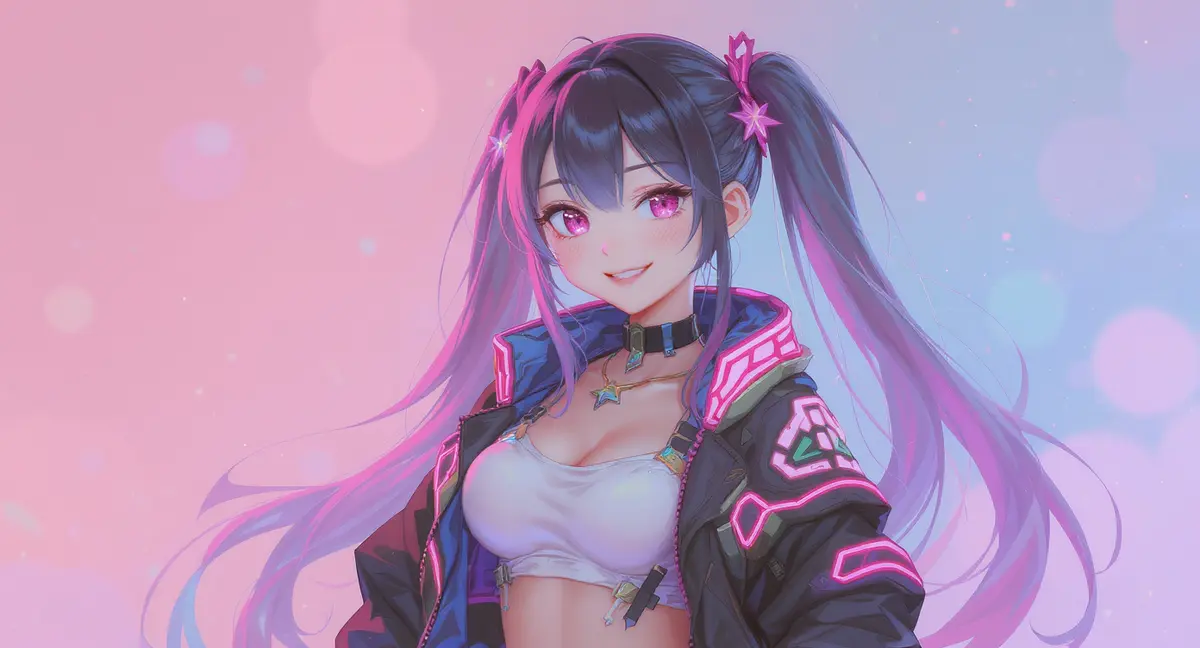
Ready to bring your own ideas to life? Try creating your own unique images with the AI tool below—it's easier than you think!
Comparing Your Options: From Free to Professional VTuber Avatar Makers
Choosing the best vtuber avatar maker depends on your goals. Here’s a breakdown to help you decide.
Free vs. Paid Tools
- Free Tools: Excellent for beginners and hobbyists. VRoid Studio (3D) and Live3D's free tier offer robust functionality without cost. However, they may have limitations in export quality, advanced features, or commercial usage rights.
- Paid Tools: Necessary for professional rigging (Live2D Cubism license) or advanced 3D animation (Blender add-ons, premium software). They provide more control, better support, and often higher quality outputs.
AI-Powered Creation vs. Traditional Design
The integration of AI is reshaping how avatars are made. AI tools can generate unique character designs, backgrounds, and even assist with texture work, significantly speeding up the initial design phase. This complements traditional skills rather than replacing them, as rigging and animation still require specialized software. For example, using PearlFrame's AI image generation, you can create multiple design variants in minutes, then refine the best one in a 3D or 2D editor.
2D vs. 3D: Which is Right for You?
- Choose 2D if: You love the anime art style, have drawing skills or can commission an artist, want a lighter system load, and plan expressive but limited movement.
- Choose 3D if: You desire full-body movement, rotation, and immersion, are comfortable with 3D software basics, and have a moderately powerful PC for rendering.
A 2024 survey of VTuber creators found that 3D models are increasingly preferred for long-term streaming due to their dynamic range, but 2D models remain popular for their artistic charm.
Advanced Tips for a Standout VTuber Avatar
Once you've mastered the basics, these tips can elevate your avatar.
- Develop a Consistent Style: Ensure your avatar's design aligns with your channel's theme, overlays, and branding. Consistency builds recognition. For inspiration on visual cohesion, explore our guide on building a strong brand identity with AI.
- Plan for Updates and Variants: Create alternate outfits, expressions, or "power-up" forms for special streams or milestones. This keeps your content fresh and engages your audience.
- Optimize for Performance: For live streaming, ensure your model is optimized (reasonable polygon count for 3D, efficient rigging for 2D) to prevent lag or high CPU usage.
- Integrate Interactive Elements: Use features like VTube Studio's item system or Live3D's effects to add props, animations, or overlays that viewers can trigger, enhancing interactivity.
- Protect Your Work: Understand the licensing terms of any assets you use. If you create original artwork, consider watermarking or registering it to protect your intellectual property.
Conclusion
Creating your own VTuber avatar is an exciting journey that blends creativity, technology, and performance. By understanding the tools available—from free vtuber avatar creator apps to professional suites—you can start small and scale up as your skills grow. Remember, the most successful avatars are those with a clear personality and purpose, backed by consistent effort and engagement. Whether you choose a 2D anime character or a dynamic 3D model, the key is to begin, experiment, and have fun.
Ready to design the visual concept for your avatar? Jumpstart your creativity with PearlFrame, our AI image generator that turns your descriptions into stunning artwork in seconds. Use it to brainstorm designs, create reference images, or even generate unique assets for your VTuber journey. Try it for free today and bring your digital persona to life!
Frequently Asked Questions
What is the easiest way to make a VTuber avatar for free?
The easiest free method is to use VRoid Studio for a 3D anime-style avatar. It requires no prior 3D modeling experience—you simply customize a base model with intuitive sliders and menus. For a 2D approach, you can use free trials of Live2D Cubism with pre-made artwork, or explore mobile apps like Reality for instant streaming avatars.
Can I create a VTuber avatar without any drawing or 3D modeling skills?
Yes, absolutely. Tools like VRoid Studio (3D) eliminate the need for modeling skills, while AI image generators can create character art from text prompts. For example, you can use PearlFrame to generate a detailed portrait of your avatar, which you can then use as a reference or even trace in simpler drawing programs. The rigging process for 2D models does have a learning curve, but numerous tutorials and community resources are available to help.
How much does it cost to make a professional VTuber avatar?
Costs can vary widely. A fully custom, professionally rigged 2D avatar from an artist can range from $500 to $3000 or more. A 3D model commission might start around $1000. However, you can significantly reduce costs by using free software like VRoid Studio and Blender, creating the avatar yourself, or leveraging AI tools for design assistance. The investment often correlates with the level of detail, uniqueness, and animation complexity you desire.
What are the system requirements for VTubing?
At a minimum, you'll need a computer with a modern multi-core processor (Intel i5 or AMD equivalent), 8GB RAM, a dedicated graphics card (NVIDIA GTX 960 or better), and a decent webcam for tracking. Live streaming adds additional load, so a stable internet connection is crucial. More complex 3D models and higher tracking fidelity will benefit from more powerful hardware.
Can I use my VTuber avatar for commercial purposes on Twitch or YouTube?
In most cases, yes—if you own the rights to the avatar. If you create it yourself using original assets or properly licensed resources, you typically have full commercial rights. If you commission an artist, ensure the contract grants you commercial usage rights. Always check the terms of service for any software or asset marketplace you use to confirm commercial permissions.
How do I make my VTuber avatar's lips sync to my voice?
Most tracking software like VTube Studio (for 2D) or VSeeFace (for 3D) includes automatic lip-sync functionality that uses your microphone input. The software analyzes your voice's volume and pitch to trigger corresponding mouth movements (open, closed, shapes for vowels) that are pre-defined in your model's rigging. You can fine-tune the sensitivity and mapping in the software settings for more natural sync.
Is it better to start with a 2D or 3D VTuber model as a beginner?
For absolute beginners, 3D models via VRoid Studio are often easier to start with because the creation and basic rigging are more automated. The learning curve for designing and customizing is gentle. Starting with 2D requires either drawing skills or commissioning art before you even begin rigging, which adds steps and potential cost. However, if you're committed to the 2D anime style and willing to learn, starting with simple PNG avatars (PNGTubing) can be a great low-commitment first step.